6.8. DataFrame Loc
.loc[]- uses fancy indexing, start and stop are included!!.iloc[]- only index numbers, behaves like Python slices
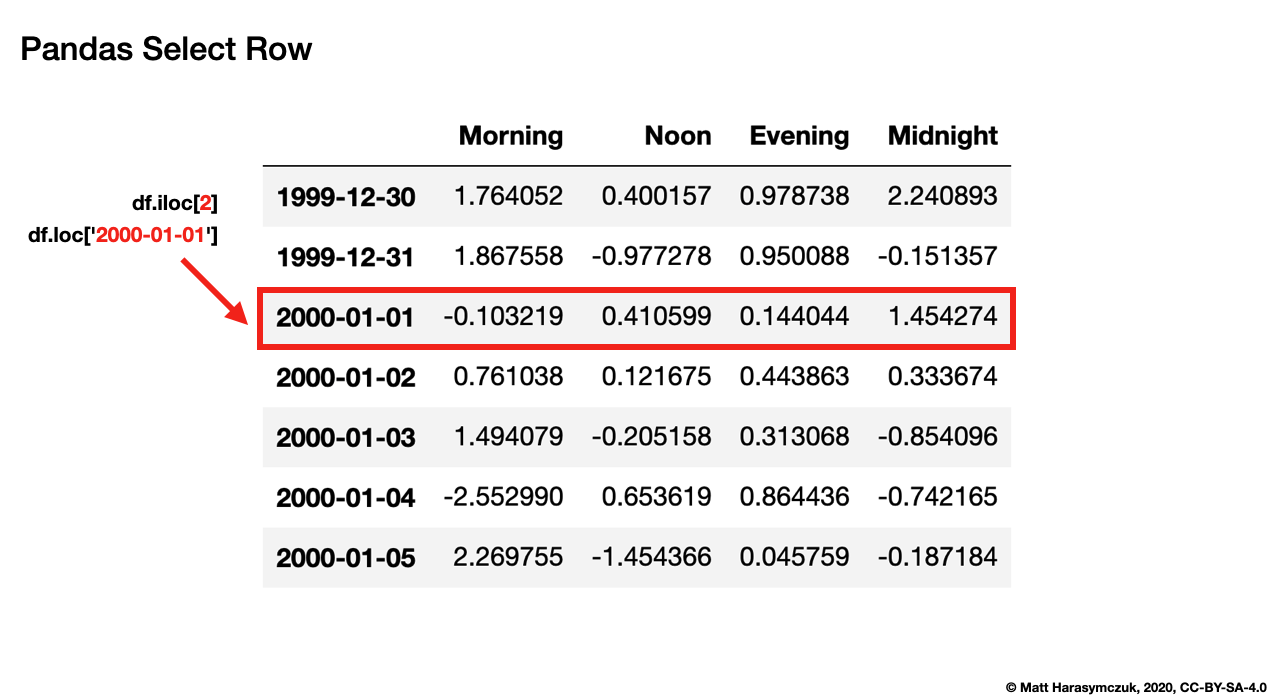
Figure 6.8. Pandas Select Row
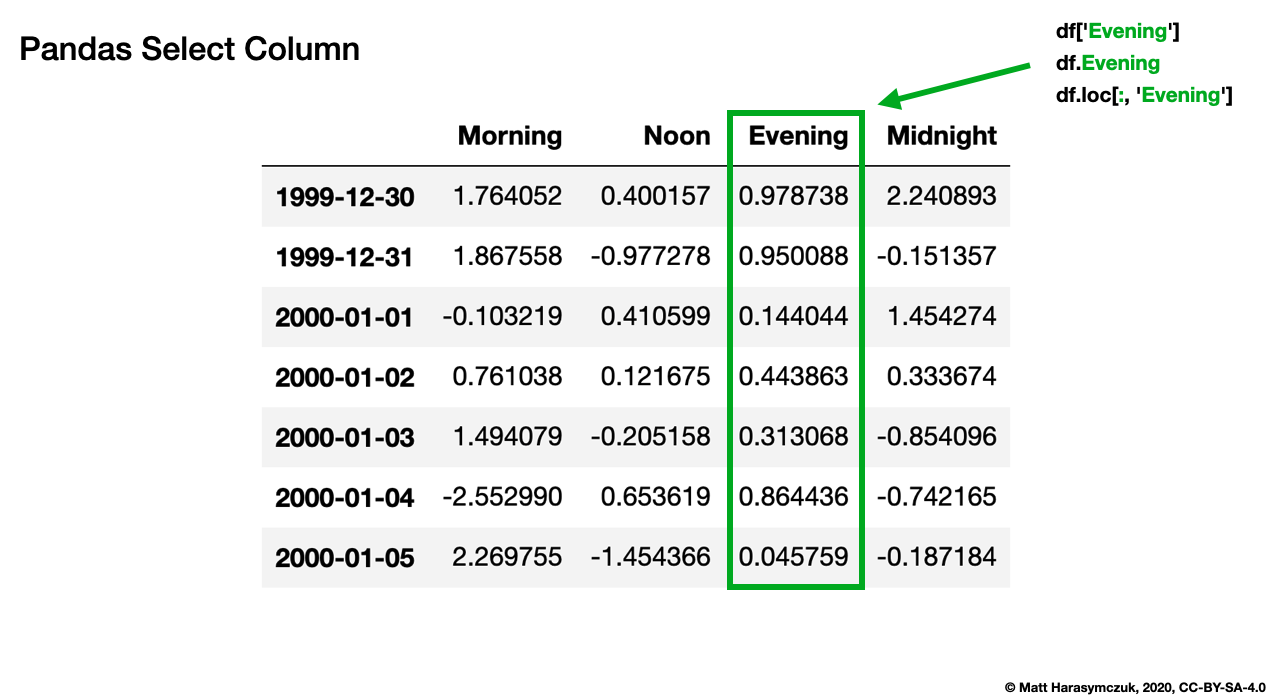
Figure 6.9. Pandas Select Cell
6.8.1. SetUp
>>> import pandas as pd
>>>
>>> df = pd.DataFrame([
...     {'firstname': 'Alice', 'lastname': 'Apricot', 'age': 30},
...     {'firstname': 'Bob', 'lastname': 'Blackthorn', 'age': 31},
...     {'firstname': 'Carol', 'lastname': 'Corn', 'age': 32},
... ], index=['a', 'b', 'c'])
>>> df
  firstname    lastname  age
a     Alice     Apricot   30
b       Bob  Blackthorn   31
c     Carol        Corn   32
6.8.2. One Row
df.loc[index]- returns row for given label
>>> df.loc['a']
firstname      Alice
lastname     Apricot
age               30
Name: a, dtype: object
6.8.3. Many Rows
df.loc[[index1, index2, ...]]- returns rows for given labels
>>> df.loc[['a', 'b']]
  firstname    lastname  age
a     Alice     Apricot   30
b       Bob  Blackthorn   31
6.8.4. Slice of Rows
df.loc[start:stop]- both start and stop are includeddf.loc[start:stop:step]- both start and stop are included, step is applied
>>> df.loc['a':'c']
  firstname    lastname  age
a     Alice     Apricot   30
b       Bob  Blackthorn   31
c     Carol        Corn   32
>>> df.loc['a':'c':2]
  firstname lastname  age
a     Alice  Apricot   30
c     Carol     Corn   32
6.8.5. One Column
df.loc[:, column]- returns column for given label
>>> df.loc[:, 'firstname']
a    Alice
b      Bob
c    Carol
Name: firstname, dtype: str
6.8.6. Many Columns
df.loc[:, [column1, column2, ...]]- returns columns for given labels
>>> df.loc[:, ['firstname', 'lastname']]
  firstname    lastname
a     Alice     Apricot
b       Bob  Blackthorn
c     Carol        Corn
6.8.7. Slice of Columns
df.loc[:, start:stop]- both start and stop are includeddf.loc[:, start:stop:step]- both start and stop are included, step is applied
>>> df.loc[:, 'firstname':'age']
  firstname    lastname  age
a     Alice     Apricot   30
b       Bob  Blackthorn   31
c     Carol        Corn   32
6.8.8. Fancy Indexing
Return row for given index is
True
Boolean list with the same length as the row axis:
>>> df.loc[[True, False, True]]
  firstname lastname  age
a     Alice  Apricot   30
c     Carol     Corn   32
Conditional that returns a boolean Series:
>>> df.loc[df['age'] >= 31]
  firstname    lastname  age
b       Bob  Blackthorn   31
c     Carol        Corn   32
Conditional that returns a boolean Series with column labels specified:
>>> df.loc[df['age'] >= 31, 'firstname']
b      Bob
c    Carol
Name: firstname, dtype: str
>>> df.loc[df['age'] >= 31, ['firstname', 'lastname']]
  firstname    lastname
b       Bob  Blackthorn
c     Carol        Corn
>>> where = df['age'] >= 31
>>>
>>> df.loc[where, ['firstname', 'lastname']]
  firstname    lastname
b       Bob  Blackthorn
c     Carol        Corn
>>> where = df['age'] >= 31
>>> select = ['firstname', 'lastname']
>>>
>>> df.loc[where, select]
  firstname    lastname
b       Bob  Blackthorn
c     Carol        Corn
6.8.9. Callable
Filtering with callable:
>>> def age_above_31(df):
...     return df['age'] >= 31
>>>
>>> df.loc[age_above_31]
  firstname    lastname  age
b       Bob  Blackthorn   31
c     Carol        Corn   32
>>> df.loc[lambda df: df['age'] >= 31]
  firstname    lastname  age
b       Bob  Blackthorn   31
c     Carol        Corn   32
6.8.10. Updating Result
SetUp:
>>> df = pd.DataFrame([
...     {'firstname': 'Alice', 'lastname': 'Apricot', 'age': 30},
...     {'firstname': 'Bob', 'lastname': 'Blackthorn', 'age': 31},
...     {'firstname': 'Carol', 'lastname': 'Corn', 'age': 32},
... ], index=['a', 'b', 'c'])
>>>
>>> df
  firstname    lastname  age
a     Alice     Apricot   30
b       Bob  Blackthorn   31
c     Carol        Corn   32
Set value for all items matching the list of labels:
>>> df.loc[df['age'] >= 31, 'lastname'] = pd.NA
>>>
>>> df
  firstname lastname  age
a     Alice  Apricot   30
b       Bob      NaN   31
c     Carol      NaN   32
6.8.11. Updating Row
SetUp:
>>> df = pd.DataFrame([
...     {'firstname': 'Alice', 'lastname': 'Apricot', 'age': 30},
...     {'firstname': 'Bob', 'lastname': 'Blackthorn', 'age': 31},
...     {'firstname': 'Carol', 'lastname': 'Corn', 'age': 32},
... ], index=['a', 'b', 'c'])
>>>
>>> df
  firstname    lastname  age
a     Alice     Apricot   30
b       Bob  Blackthorn   31
c     Carol        Corn   32
Set value for an entire row:
>>> df.loc['b'] = pd.NA
>>>
>>> df
  firstname lastname   age
a     Alice  Apricot  30.0
b       NaN      NaN   NaN
c     Carol     Corn  32.0
6.8.12. Updating Column
SetUp:
>>> df = pd.DataFrame([
...     {'firstname': 'Alice', 'lastname': 'Apricot', 'age': 30},
...     {'firstname': 'Bob', 'lastname': 'Blackthorn', 'age': 31},
...     {'firstname': 'Carol', 'lastname': 'Corn', 'age': 32},
... ], index=['a', 'b', 'c'])
>>>
>>> df
  firstname    lastname  age
a     Alice     Apricot   30
b       Bob  Blackthorn   31
c     Carol        Corn   32
Set value for an entire column:
>>> df.loc[:, 'lastname'] = pd.NA
>>>
>>> df
  firstname lastname  age
a     Alice      NaN   30
b       Bob      NaN   31
c     Carol      NaN   32